CCL How-tos
How do I start with a new CCL-based application?
The following steps will create a rudimentary CCL-based app with corresponding CMake project files. The resulting CMake files can in turn be used to generate a Visual Studio solution for Windows, an Xcode project for Mac, etc.
Use the CCL Builder tool for your platform found in:
CCL SDKMac: ~/Documents/CCL\ SDK-<version>-macOS/bin/cclbuilder Linux: /usr/bin/ccl/<version>/linux-x86_64/cclbuilder Win: C:\Program Files\Crystal Class Library/<version>/bin/win-x86_64/cclbuilder.exe
Source ReleaseMac: tools/bin/mac/ccl/cclbuilder Linux: tools/bin/linux/ccl/x86_64/cclbuilder Win: tools\bin\win\ccl\cclbuilder.exe
Run CCL Builder without arguments. This prints a list of available presets.
Run CCL Builder with your settings:
tools/bin/win/ccl/cclbuilder
  -template apptemplate -vendor ccl -platforms win
  -destination .\applications\ccl\test\testapp ProjectTitle TestApp
The -dest parameter can be an absolute path or relative to the current working directory of the command line
all parameters except the template name are optional, the tool asks for missing values interactively
Tip
For input options, run cclbuilder command without arguments. For interactive mode, run cclbuilder with -i
How do I add a resource file and access it from the application?
In your application’s main CMake file (e.g. “applications/myapp/cmake/CMakeLists.txt”), add your file to the <myapp>_resources list.
If this list does not exist, create it (list (APPEND myapp_resources <resource file> …)) and add a line ccl_add_resources (myapp ${myapp_resources}) at the end of your main CMake file
Address it in the application code using the ResourceUrl class
How do I run unit tests?
From the command-line
The ccltestrunner tool loads test collections from all provided modules in order to run the registered tests. One or more modules can be provided as command-line arguments.
The following example runs all tests registered in bundles jsengine and sqlite (.dll on Windows).
ccltestrunner jsengine.bundle sqlite.bundle
Note
Modules which register tests on CCL_KERNEL_INIT_LEVEL need to be linked by the testrunner (e.g. cclgui). Those tests are always available.
By default, all collected tests are run and the results are printed to the console.
CMake and IDE integration
Unit test IDE integration is disabled by default and must be enabled by running cmake with option -DCCL_ENABLE_TESTING=ON.
For each module which contains a ccl_add_test (<target>) call, a custom target <target>_unittest is added which runs the tests defined in <target>.
For XCode and Visual Studio the testrunner is set as the debug executable for <target> which allows for fast development iterations.
Note
Tests registered on CCL_KERNEL_INIT_LEVEL are always run by default.
Filtering Tests
The tests to be run can be filtered using wildcards. The following command will run all tests from suite GUITestSuite.
ccltestrunner -filter=GUITestSuite* ccltest.bundle
A single test can be run by specifying:
ccltestrunner -filter=*TestDpiScale ccltest.bundle
Or, if there are multiple tests with the same name:
ccltestrunner -filter=GUITestSuite_TestDpiScale ccltest.bundle
Note
Filtering can also be applied as an argument to the debug executable in XCode and Visual Studio.
How do I add a unit test?
Macros and base classes for unit tests can be found in
ccl/base/unittest.h
Supported test classes are:
CCL_TEST_F(Tests sharing a test fixture)CCL_TEST_P(Parameterized tests)CCL_TEST_T(Typed tests)
Tests are created from two arguments, the test suite name and the test name, where a test suite identifies a group of tests.
Simple Tests
#include "ccl/base/unittest.h"

using namespace CCL;

//////////////////////////////////////////////////////////////////////////////////////////////////

CCL_TEST (BicycleTest, BicyclesHaveTwoWheels)
{
    AutoPtr<Bicycle> bicycle = NEW Bicycle;
    CCL_TEST_ASSERT_EQUAL (2, bicycle->getWheelCount ());
}
Test Fixtures
A test fixture is a base class shared by multiple tests. Tests using a fixture can access public and protected members through inheritance.
Note
The test suite name of a test using a test fixture must be equal to the name of the test fixture. This is a convenient practice among testing frameworks but should not lead to the assumption that the terms “fixture” and “suite” are interchangable or otherwise related.
#include "ccl/base/unittest.h"

using namespace CCL;

//////////////////////////////////////////////////////////////////////////////////////////////////

class BicycleTest: public Test
{
public:
    // Test
    void setUp () override
    {
        bicycle = NEW Bicycle;
    }

protected:
    AutoPtr<Bicycle> bicycle;
};

//////////////////////////////////////////////////////////////////////////////////////////////////

CCL_TEST_F (BicycleTest, BicyclesHaveTwoWheelsByDefault)
{
    CCL_TEST_ASSERT_EQUAL (2, bicycle->getWheelCount ());
}

//////////////////////////////////////////////////////////////////////////////////////////////////

CCL_TEST_F (BicycleTest, BicyclesWithoutWheelsAreUseless)
{
    bicycle.removeWheel (Bicycle::kFrontWheel);
    bicycle.removeWheel (Bicycle::kRearWheel);

    CCL_TEST_ASSERT_EQUAL (2, bicycle->getWheelCount ());
    CCL_TEST_ASSERT (bicycle->isUseless ());
}
Test Collections
In order to run tests, each module (e.g. plug-in or service) must add and register a test collection using macros CCL_ADD_TEST_COLLECTION and CCL_REGISTER_TEST_COLLECTION (see existing tested modules).
#include "ccl/base/unittest.h"

using namespace CCL;

//////////////////////////////////////////////////////////////////////////////////////////////////
// Test Factory
//////////////////////////////////////////////////////////////////////////////////////////////////

CCL_ADD_TEST_COLLECTION (BicycleTests)

//////////////////////////////////////////////////////////////////////////////////////////////////
// CCLGetClassFactory
//////////////////////////////////////////////////////////////////////////////////////////////////

CCL_EXPORT IClassFactory* CCL_API CCLGetClassFactory ()
{
    ClassFactory* factory = ClassFactory::instance ();
    if(factory->isEmpty ())
    {
        ...


         CCL_REGISTER_TEST_COLLECTION (factory,
                                      UID (0x704C83F3, 0x6C5A, 0x4EB2, 0x89, 0xCC, 0x7A, 0xE7, 0xA3, 0xCA, 0xC8, 0x41),
                                      BicycleTests)
    }

    return factory;
}
Range-based for loops
The CCL container classes support the range-based for loops introduced in C++11. Initialization via braced-init-list is also available for some containers:
Vector<int> intVector = { 1, 2, 3 };
for(auto i : intVector)
    string << i;
For object-based containers derived from CCL::Container, the iteration returns CCL::Object pointers:
ObjectList urlList;
for(auto obj : urlList)
{
    Url* url = static_cast<Url*> (obj)
    string << UrlFullString (*url);
}
The template iterate_as<> can be used to perform a static_cast to a given class internally in the iteration:
for(auto url : iterate_as<Url> (urlList))
    string << UrlFullString (*url);
How to create a new type?
Object
New types will in most cases be derived directly or indirectly from CCL::Object. It is the fundamental base class with persistent storage and implements a couple of interfaces to work with.
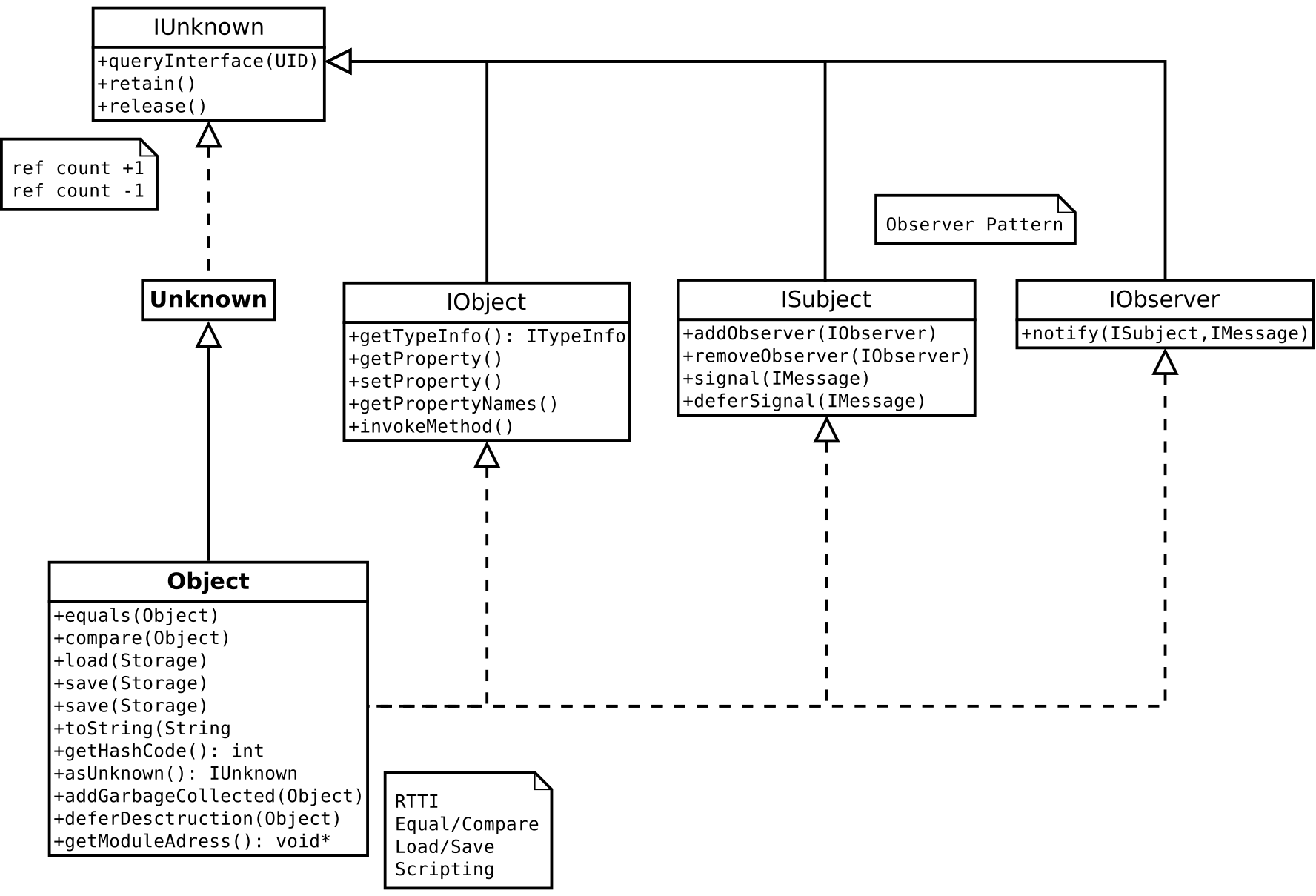
CCL::Object inherits CCL::Unknown and thus implements CCL::IUnknown for object lifetime handling. Object lifetime is managed by a reference counter:
Object* obj = NEW Object;    // ref count = 1
obj->retain ();              // ref count = 2
obj->release ();             // ref count = 1
obj->release ();             // ref count = 0 ... delete
obj->release ();             // CRASH!
The define NEW is used generally instead of new and is redirected to an overwritten new operator. If DEBUG is set, this also allows advanced debugging (finding memory leaks).
RTTI
The macro DECLARE_CLASS is used in the header file to declare the Runtime Type Information (RTTI) for a class. The necessary definitions are done in the source file using the macro DEFINE_CLASS. This declares a couple of functions and a static object of type CCL::MetaClass that carries the type information. The object is created in the definition and registers the type in the CCL::MetaClassRegistry in the CCL::Kernel singleton. The RTTI is used for allocating objects, casting objects to specific interfaces or figuring out if an object can be used in a certain way (interfaces).
Tip
The class macros used in the declaration of types also define the type SuperClass for the parent class. You should always use that type in your functions to avoid searching all over your code when changing the inheritance.
// get a reference to the MetaClass object of a type
MetaClassRef ref = ccl_typeid<Class> ();

// check if an object can be casted to a specific type
obj->can_cast (ref);

// get a pointer to a specific interface of an object
UnkownPtr<Subject> subject (object);
if(subject)
  subject->addObserver() // ...
Identification
Interfaces and types in the class registry are identified using a GUID. The GUID (Core::UIDBytes) is generated during development and defined in the header file of an interface or class using the macro DEFINE_CID for classes (in the namespace CCL::ClassID) and DEFINE_IID_ (in the namespace CCL) for interfaces. This way you can easily create an object or get a specific interface for an object.
// create new instance
AutoPtr<IFolderSelector> fs = ccl_new<IFolderSelector> (ClassID::FolderSelector);
When you implement a type you inherit the queryInterface function for your type from CCL::Object for the basic interfaces. You can also overwrite the queryInterface function and use the macro QUERY_INTERFACE within that function to simply return a matching pointer if your type implements that interface (or even simpler use the macro CLASS_INTERFACE in the class declaration for up to 3 interfaces). You can also provide convenient access to an interface of one the members of your type in your overwritten function. Generally you should pass the queryInterface to your parent class using SuperClass::queryInterface for inherited interfaces.
Creating objects from other modules with ccl_new
ccl_new is used to create an instance of a class that is implemented in another module than the calling code (so the object can not be created directly via it’s constructor). This does not work automatically with every class - to support it, the class has to
use the class macros
DECLARE_CLASSin the declarationuse the
DEFINE_CLASSorDEFINE_CLASS_PERSISTENTin the implementationdefine a unique class ID with the
DEFINE_CLASS_UIDmacro in the implementationthis class ID must be made available in a public header file, so that the calling code can access it. It’s typically placed in a namespace
ClassIDinside the namespace of the class (example:Media::ClassID::AudioFile)
ccl_new fails if a class with the given class ID was not found, or the class doesn’t implement the interface specified by the template argument Interface of ccl_new.
Objects created via ccl_new should be relased via ccl_release, to ensure that the framework can unload the corresponding module after the last instances was released. This is not necessary for classes implemented in the application executable or the CCL framework, their instances can be released with a simple release ().
In the FolderSelector example of the previous section, we created an object that is implemented in the cclgui module (the fully classified class ID is CCL::ClassID::FolderSelector), so ccl_release was not necessary.
Note: there is also a variant of ccl_new that takes a class name instead of a UID. This is used mainly for scripting and should be avoided in C++ code.
More class macros
There are also other macros for class declarations and definitions:
Macro |
Use Case |
|---|---|
These macros can be used for a class that is not created directly (no creation or clone functions). |
|
These macros can be used for a class that is not created directly (no creation or clone functions) and should not be added to the class registry. |
|
This macro can be used if the class construction shall not be added to the class registry. |
|
This macro can be used to overwrite the persistence name of the type (normally the class name is used). |
|
Using this macro (also available for 2+ interfaces) in the public section of the class declaration defines the |
How can objects communicate with each other?
ISubject
The interface CCL::ISubject is implemented in CCL::Object to allow messages to be passed between objects using a observer pattern. If an object wants to be notified upon the change of another object (observer), it would register itself for changes on the other object (subject). Example:
Observer self registration at fileList:
// the observer adds himself as observer to the subject (fileList)
fileList->addObserver (this);

// the observer must also remove himself if he is no longer
// interested in updates (or doesn't live any longer)
fileList->removeObserver (this);
Subject fileList sends a message on state change via signal ():
signal (Message (kChanged));
Observer implements notify () to process the incoming signal, identifies sender via subject argument:
void CCL_API FileListComponentBase::notify (ISubject* subject, MessageRef msg)
{
  // check which subject sends the notification (observer might be registered to many subjects)
  if(subject == fileList)
  {
    // check which message is send by the subject
    if(msg == kChanged)
      // react on the message ... e.g. change state
      updateState ();

    // objects can be passed in the message parameter as Variant
    Url* path = unknown_cast<Url> (msg[0].asUnknown ());
    // ... or
    UnknownPtr<IUrl> path = msg[0].asUnknown ();

    // sometimes it makes sense to forwarded the message to other objects
    // who are registered to this object as observers
    // ... in this perspective this object becomes the subject
    signal (msg);
  }
}
Internally, the actual message passing is much more sophisticated then the described observer pattern and the messages are processed by the CCL::SignalHandler singleton that also implements synchronisation, queuing and scheduling together with several other things.
SignalSlot
For types derived from CCL::Component you might also run across the internal member signalSlots of type CCL::SignalSlotList where you can register for messages using CCL::SignalSlotList::advise.
For sending messages to a certain observer (e.g. with the possibility to delay messages), you might run across something like
(NEW Message ("triggerScanning"))->post (this)
where the observer side looks exactly the same. In this example the message is sent to the object itself. This is a common pattern, if you want to do some processing delayed, maybe after the messages caused by your code are already processed. In this case it is important to call CCL::SignalSource::cancelSignals in the destructor of the object.
In CCL::ISubject and CCL::IObserver you also find the following static helper methods:
// ISubject, observer de-/registration
addObserver (IUnknown* subject, IObserver* observer)
removeObserver (IUnknown* subject, IObserver* observer)

// IObserver: send message
notify (IUnknown* observer, ISubject* subject, MessageRef message)
What does the View Model look like?
Overview
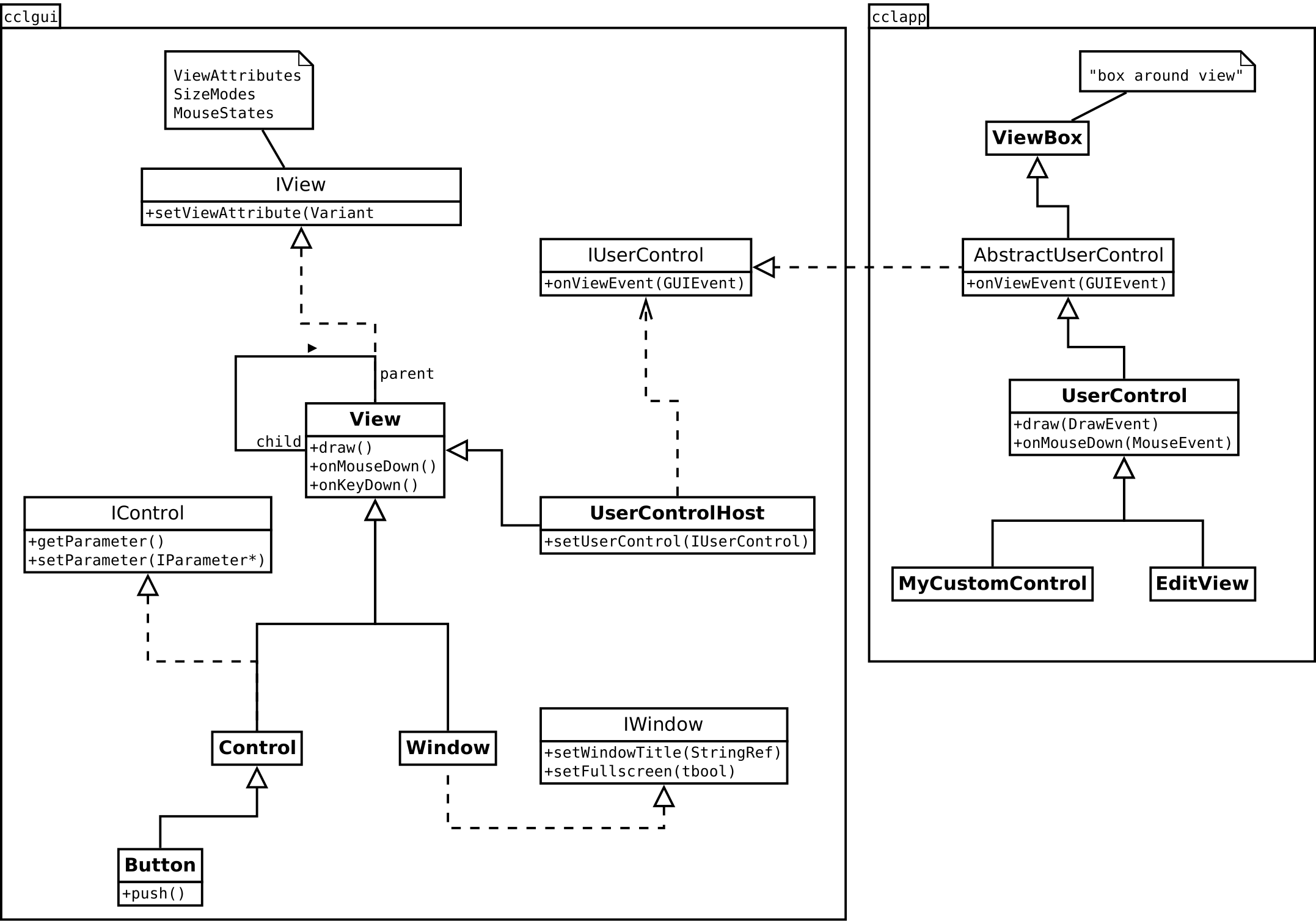
The two packages cclgui and cclapp in the picture do not only translate to namespaces, but also to libraries (cclgui is compiled to a dynamic library and cclapp is linked statically to the application). The boundary between cclgui and cclapp is the boundary between a shared library and the application (or another module) and so only interfaces are passed to maintain binary compatibility.
View
The UI of an application is constructed as a tree of view objects. A view occupies a rectangular area on the screen. It’s responsible for drawing itself and can handle user input via keyboard, mouse and touch events. Views can be nested: a view can contain child views and has a pointer to its parent view (composite). The root of such a view tree is typically a Window object which represents a window on the screen of the underlying operating system.
Note
The base class CCL::Window is inherited by CCL::NativeWindow (a typedef that is set at compile time according to the compile target WINDOWS/MAC/IOS/ANDROID to the real name of the type) and overwrites/calls the Window functions according to the underlying OS.
When a view is resized (e.g. when the user sizes the window or moves a divider), the size member is changed and onSize is called, where the child views are layouted according to their size mode (and also onSize is called on them, indirectly so they can do the same with their children). On the other hand, when the size of a child view changes (e.g. because some internal condition changed), the parent view is informed by onChildSized (this is not recursive … while the parent is doing a resize, he does not care about child size changes).
Tip
Keeping a pointer to a view for a longer time can be dangerous, as the view might be destroyed at some point, e.g. when the user closes a window. For safely dealing with this scenario, you can use a CCL::ViewPtr, that automatically nulls the pointer to the view when the view object is destroyed. This is actually just a typedef for the more general CCL::ObservedPtr, that can be used with any object that sends a kDestroyed message in its destructor (though not every class does that).
Accessing views from application code
An application can work a framework view via the interfaces CCL::IView and CCL::IViewChildren. More convenient access is possible with the CCL::ViewBox class, that provides more getter and setter methods (many of these wrap calls to CCL::IView::getViewAttribute and CCL::IView::setViewAttribute).
Controls
The cclgui framework implements a set of standard views. The most import ones are controls (Control) like Button, Slider, Knob. A control typcially displays and modifies the state of a parameter object, that is provided by a component of the application.
There are also more complex views like a ListView and TreeView. The content displayed in these so called ItemViews is provided by the application via the IItemModel interface, that also allows to define how items are displayed and to interact with the data.
Creating views
Views are typically created from a declarative description in a skin XML file, where the basic building block is a Form.
Alternatively, views can be created with their class ID and the ViewBox constructor, and then be assembled to form a view tree.
Tip
The Control class derived from View adds the implementation of the CCL::IControl interface for parameter handling. See Switching from Qt for model view examples.
User Controls
For implementing a custom view on the application level, you can’t derive a class directly from the framework’s View class, because it’s in a different module. Instead, you have to derive from UserControl. A UserControl is backed by a special view called the UserControlHost, which represents the control in the view tree in cclgui.
UserControlHost and UserControl communicate accross module boundaries via the interfaces CCL::IUserControlHost and CCL::IUserControl: e.g. all methods for drawing and event handling are forwared from the UserControlHost to its UserControl via CCL::IUserControl::onViewEvent.
Components
Components are the building blocks of an application. They can help keeping parts of the application logic modular and reusable. Many of the typical tasks of a component are related to the UI, like managing parameters, creating views and handling commands and context menus - a component can be seen as the backend of the UI.
The application module (and every other module that links to cclapp) has a Runtime object (of class RootComponent) that is the root of a global component tree (composite). Many central instances, including the Application object, ‘’DocumentManager`` are part of that tree.
Other components are assembled dynamically at runtime, they don’t necessarily have to be part of that component tree. A typical example is a component that provides parameters for a modal dialog and only lives while the dialog is open.
How can I implement commands?
Implementing commands in your class (UsefulClass in this example) is very easy by using inheritance and a couple of macros. First of all you inherit your class from the template CCL::CommandDispatcher
class UsefulClass: public BaseClass,
                   public CommandDispatcher<UsefulClass>
{
  // ...
}
In the public interface of the class you can use two macros to declare necessary things for the command execution. Additionally you need a method that is executed, when the command is triggered (onDoSomething in this example). This method is also public and starts with on... usually. The category (Useful in this example) is used to add structure to the commands and can be seen in the Keyboard Shortcuts window or the Macro Organizer.
public:
  DECLARE_COMMANDS (UsefulClass)
  DECLARE_COMMAND_CATEGORY ("Useful", BaseClass)

  bool onDoSomething (CmdArgs args);
In the implementation, you can also use macros to define everything necessary:
//////////////////////////////////////////////////////////////////////////
// Commands
//////////////////////////////////////////////////////////////////////////

BEGIN_COMMANDS (UsefulClass)
  DEFINE_COMMAND ("Useful", "Do Something", UsefulClass::onDoSomething)
END_COMMANDS (UsefulClass)

//************************************************************************
// UsefulClass
//************************************************************************

IMPLEMENT_COMMANDS (UsefulClass, BaseClass)
The user will see the command category and name (first and second parameter) in the UI. For this reason, they are localized and should use title capitalization.
If you do not define commands by using the macros, you need to implement this virtual method in your class to process the command messages:
tbool CCL_API UsefulClass::interpretCommand (const CommandMsg& msg)
Translations
If you are using the same string for the commands also in a BEGIN_XSTRINGS section (this might be necessary, when you also want to add the same command in a menu), you should use “Command” as the context in the BEGIN_XSTRINGS macro. In that case the localized string is in the same context as the one defined in the DEFINE_COMMAND and only need to be translated once. As an alternative you can get the translated title for a command that is already registered in the command registry by calling
CommandRegistry::getCommandTitle ("Category", "Name")
The quickest way to add an existing command to a menu is
menu->addCommandItem (CommandRegistry::find (CSTR ("Useful"),
  CSTR ("Do Something")), handler)
This will add a menu entry with the translated title of the command.
Follow indicator
If you want to append the typical “…” to a command menu entry to indicate that the execution will be interactive you can simply use the pattern
menu->addCommandItem (String ()
  << XSTR (Useful)
  << IMenu::strFollowIndicator, "Useful", "Do Something", handler)
To achive the same pattern using the command title lookup you need to set the optional
followIndicator parameter of CommandRegistry::addCommandItem () like:
menu->addCommandItem (CommandRegistry::find (CSTR ("Useful"),
  CSTR ("Do Something")), handler, true)
Multi command registration
If you like to register several commands in your class using the same method, you can use the macros like this:
BEGIN_COMMANDS (UsefulClass)
  DEFINE_COMMAND ("Useful", 0, UsefulClass::onDoSomething)
END_COMMANDS (UsefulClass)

REGISTER_COMMAND ("Useful", "Do Something Once")
REGISTER_COMMAND ("Useful", "Do Something Twice")

IMPLEMENT_COMMANDS (UsefulClass, BaseClass)

bool UsefulClass::onDoSomething (CmdArgs args)
{
  if(args.name == "Do Something Once")
  {
    //...
  }
  else if(args.name == "Do Something Twice")
  {
    // ...
  }
}
Command arguments
It is also possible to define arguments for your command. In this example, two arguments named Description and Powerswitch are added:
DEFINE_COMMAND_ARGS ("Useful", "Do Something",
  UsefulClass::onDoSomething, 0, "Description, Powerswitch")
You can easily work with the given parameters in the command function using the CCL::CommandAutomator like in this example.
bool UsefulClass::onDoSomething (CmdArgs args)
{
  String description;
  if(!CommandAutomator::Arguments (args).getString ("Description", description))
  {
    description = "not given";
  }

  bool isPowerswitch = false;
  CommandAutomator::Arguments (args).getBool ("Powerswitch", isPowerswitch);
  if(isPowerswitch)
  {
    // ...
  }
Check only
The method for handling the command has a Boolean return value. This return value is especially important for pre-checking the command. A command might not always be executable. To be able to check this before the execution (or even visualize it in the user interface) the command is called first with a special flag that you can get from the CmdArgs parameter using the method CCL::CommandMsg::checkOnly. You need to return true if the command can be executed or false otherwise. In this example the command can always be executed, but the real functionality of the command is only executed, when checkOnly () is false;
bool UsefulClass::onDoSomething (CmdArgs args)
{
  if(!args.checkOnly ())
    someMethodDoingSomething ();

  return true;
}
How can I edit and debug skins?
When creating or editing a skin file, you can easily check the result without the need to restart the application. In the debug build of the application you find a menu entry Debug were you can reload the skin using the menu command Reload Skin or Shift+F10 while the application runs. If you want to inspect the skin of a running application (find the file you need to edit or watch properties of the element you see on screen) the CCL Spy comes in handy (menu command Show CCL Spy or Ctrl+Alt+O).
You can inspect elements by pointing the mouse cursor to them and pressing the Ctrl key. The Views tab in the CCL Spy navigates to the corresponding element in the tree. On the right hand side you can see details of the selected element and open the skin file by clicking on the file name. The other way round you can click on an element in the tree to have a red rectangle flashing shortly in the application window to highlight the element. A double click toggles a permanent highlight. The Documentation tab in the CCL Spy allows you to browse or search for information about skin elements and styles.
How can I do something asynchronously?
You are able to execute functions asynchronously using a class that is derived from CCL::AsyncOperation and thus implements the interface CCL::IAsyncOperation.
In this example we look at a situation where the user wants to rename an object with a double click in a ListView. In this case there is no window opened to enter the new name, but a small edit box is shown above the item that will be renamed. We should not open the edit box synchronously (and wait for the user input). On the other hand we need to apply the user input to the selected object afterwards.
// we get the current object name
StringRef name = object->getName ();

// editString provides us with an IAsyncOperation to let the user enter a string
IAsyncOperation* operation =  editString (name, customRect, *info, editStyle);

// now we can create a promise to execute that operation asynchronously
Promise p (operation);

// to do the actual editing, we can simply pass a closure to the 'then' method
p.then ([this, object] (IAsyncOperation& operation)
{
  if(operation.getState () == IAsyncInfo::kCompleted)
  {
    ObjectFunctions functions (object);
    functions.renameObject (object, operation.getResult ().asString ());
  }
});
In this case it is important that the lambda is not executed during the runtime of this method. It is safe to add this and object in the capture, but it would cause undefined behaviour if we pass in automatic variables by reference.
Tip
IAsyncOperation interface also provides additional functionality:CCL::IAsyncOperation::cancel can be called to cancel the operationCCL::IAsyncOperation::close must be called after the result of the operation is consumedCCL::IAsyncOperation::setProgressHandler allows to attach a handler that implements CCL::IProgressNotifyWhat kind of collections can I use?
The following class diagram gives you a rough overview of some available classes for collections of objects.
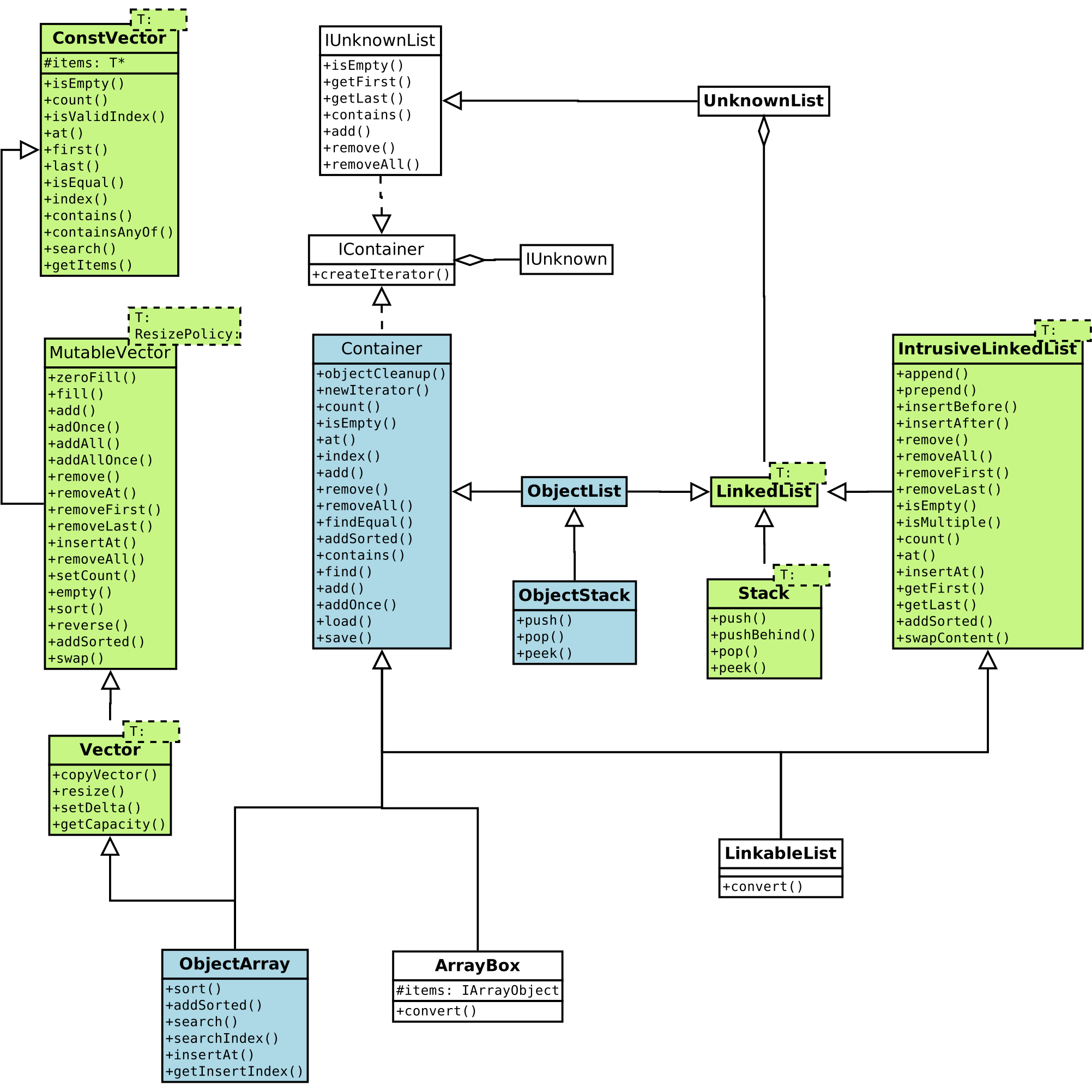
Collections based upon templates are shown in green. For most purposes the Core::Vector is a good choice for collections that are linear in memory (the namespace Core is imported in the namespace CCL).
The template classes Core::LinkedList and CCL::Stack provide collections that are based upon linked lists. For avoiding the extra collection object holding the pointers for the linked list, the Core::IntrusiveLinkedList can be used for elements that hold the pointers themselves. You can easily use it by instantiating the collection with IntrusiveLinkedList<Type> list and making sure that Type contains the necessary member by inheriting it from InstrusiveLink<Type>.
The classes shown in blue are dealing with objects derived from CCL::Object. If the type is known (storing collection of things within a class) it is more convenient to use CCL::ObjectArray to store objects. The CCL::ObjectStack provides a similar comfort if you need to work with a stack of objects and is based on CCL::ObjectList, that provides a linked list of CCL::Object. This collections (derived from CCL::Container) allow to pass ownership of it’s items by calling objectCleanup (true).
What is a Variant?
CCL::Variant is a type that can store different data types and allows accessing them safely. Integer values are always stored as 64 bit integer internally and floating point values as double. The Variant type can also store unicode strings or a pointer to CCL::IUnknown. The current type of the variant can be obtained by CCL::Variant::getType that returns a value of the the CCL::Variant::Types enum or you can use one of the type methods:
You can pass a Variant safely to another object, when you use CCL::Variant::share. It retains the pointer in the variant for non numeric types.
Note
The Variant stores internal information in the lower two bytes of the internal type information. The upper two bytes can be used for user defined flags via CCL::Variant::setUserFlags, CCL::Variant::getUserFlags or to store a user value that will be automatically shifted from/to the upper bytes via CCL::Variant::setUserValue, CCL::Variant::getUserValue.
The Variant implements casting and assignment operators as well as comparison operators. You can access the value stored in the Variant using matching methods for the type (CCL::Variant::asString, CCL::Variant::asFloat, …). Conversions are done automatically where applicable.
In the case of CCL::Variant::asString the method will return an empty string, when the type is not string. You can use CCL::Variant::toString instead to convert the numeric value to string. The other way round needs the parse functions such as CCL::Variant::parseInt, CCL::Variant::parseFloat to convert a string to a numeric value. You can optionally pass in a default value to these functions that is returned if the conversion from string to numerical value fails.